Short answer: every vessel in the brewery twin — mash tun, lauter tun, kettle, whirlpool, the cylindro-conical fermenters, the bright tanks — was modeled in code with React Three Fiber, not sculpted in Blender. Brewhouse equipment is mostly cylinders, cones and domes, so procedural geometry keeps the bundle tiny, kills the asset pipeline, and makes the geometry data-driven. The real trick isn't the meshes; it's that one file describes the whole plant — every vessel and every flow edge — and the scene, labels, flowing pipes and charts all read from it. Model once, render everywhere. And yes, there's a clear line where Blender becomes the right tool — I'll draw it honestly at the end.
This is Part 2 of the series. Part 1 covered the why and the scaffolding — getting a Fabric-hosted app live in an afternoon with the Rayfin SDK. Here we build the thing people actually look at: the vessels, and the flow between them.
The decision: code the vessels, don't sculpt them
The series teaser said "model the vessels in Blender," and that's the instinct everyone has. But look at a brewhouse honestly: a mash tun is a cylinder with a domed top and a motor on it. A fermenter is a cylinder with a cone welded underneath. A kettle is a cylinder with a chimney. These are primitives — and Three.js gives you primitives for free.
So I went procedural. Every vessel is built from cylinderGeometry, coneGeometry and a half-sphereGeometry dome, assembled in React Three Fiber. The payoff is concrete:
- No asset pipeline — no exporting glTF, no texture files, no draco compression, nothing to keep in sync with the code.
- A tiny bundle — the heavy part of the app is the Three.js library itself, not the models, which matters because the whole thing ships as static assets to Microsoft Fabric.
- Geometry that's data-driven — a vessel's size and shape come from numbers, so the same component renders a squat lauter tun and a tall HLT just by changing arguments.
Making each vessel look like itself
A brewery where every tank is an identical silver cylinder is useless — you can't read it. The fix is function-specific detail: the parts that tell a brewer what they're looking at.
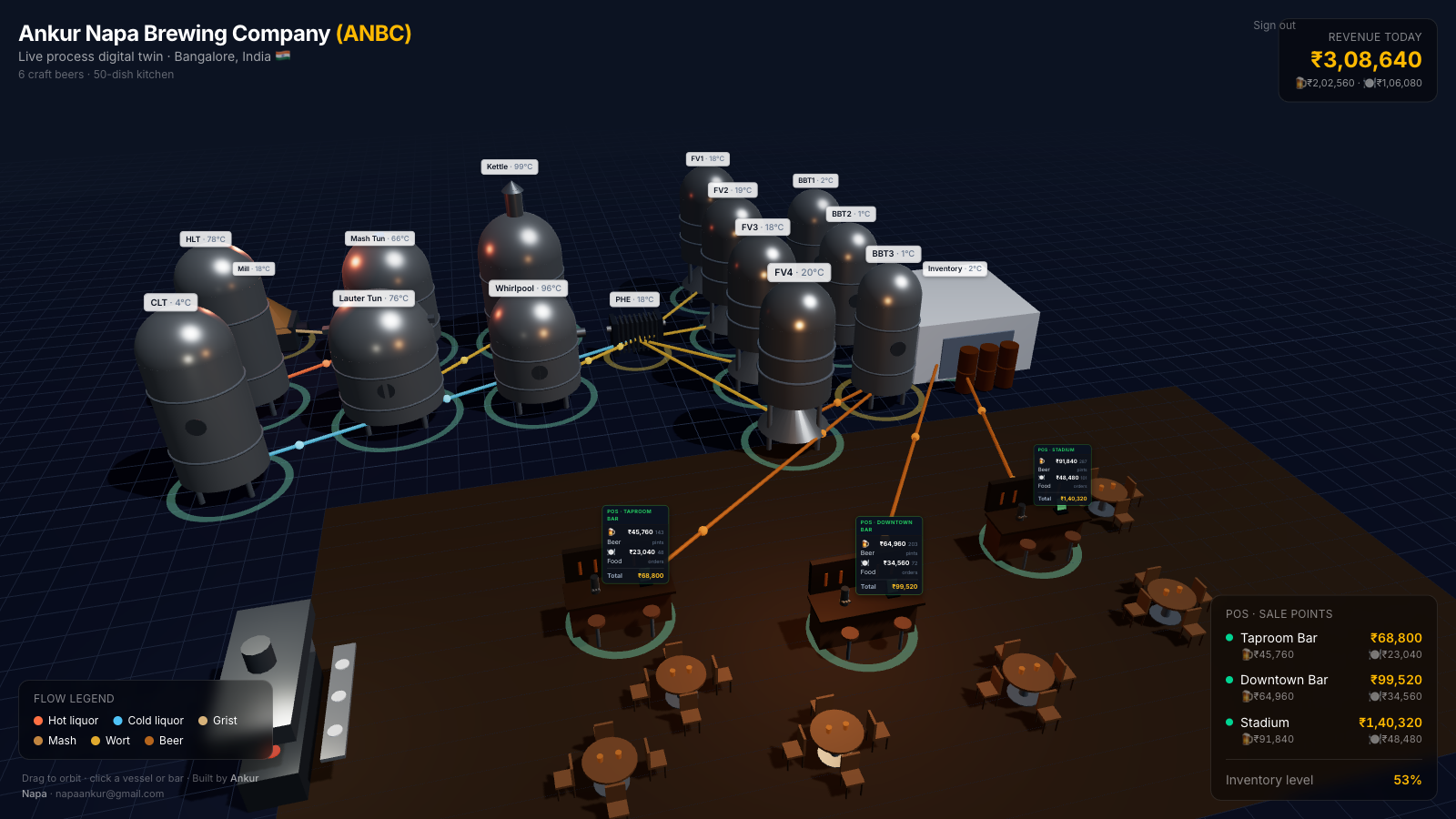
- Mash tun → an agitator gearbox and drive motor on top.
- Lauter tun → a rake-drive bridge across the vessel.
- Kettle → a tall vapor stack and condenser.
- Whirlpool → a short stack with a tangential inlet pipe.
- Fermenters → cylindro-conical, standing on legs, wrapped in glycol-jacket bands.
- Bright tanks → pressure-domed and slimmer.
I encoded these as a topper on each vessel, so the geometry follows the function. Add legs, insulated cladding and hoop bands to the tanks, and the brewhouse becomes legible at a glance — you can find the kettle by its stack before you ever read a label.
The real trick: one file describes the whole plant
Here's the part that separates a maintainable twin from a 3D scene that rots. There's a single process-data file. It lists every vessel — id, display name, position on the floor, radius, height, what it holds, and its topper — and every flow edge: a from vessel, a to vessel, and what's flowing between them (hot liquor, grist, mash, wort, beer).
Everything reads from that file:
- the scene places each vessel at its position,
- the labels and status rings come from the same records,
- the pipes are drawn between the
fromandtopositions of each edge, - even the per-vessel charts key off the vessel id.
Move a tank, rename it, or add a new transfer line, and you edit data, not geometry. The model is the source of truth; the 3D is just one way of expressing it. (The other expression — the live numbers — comes in Part 3.)
Animating the flow
A static plant is a diagram. What makes it a twin is seeing product move. For each flow edge, the scene draws a thin pipe between the two vessels and runs a few small particles along it, colored by content — amber for mash, gold for wort, copper for beer, blue for cold liquor. The render loop interpolates each particle's position from from to to and loops it.
Because flow is data, adding a transfer — say, a new line from a bright tank to a fourth tap — is one entry in the edges list. No new mesh, no manual placement. The pipe and its moving product appear automatically.
Per-vessel charts that match the process
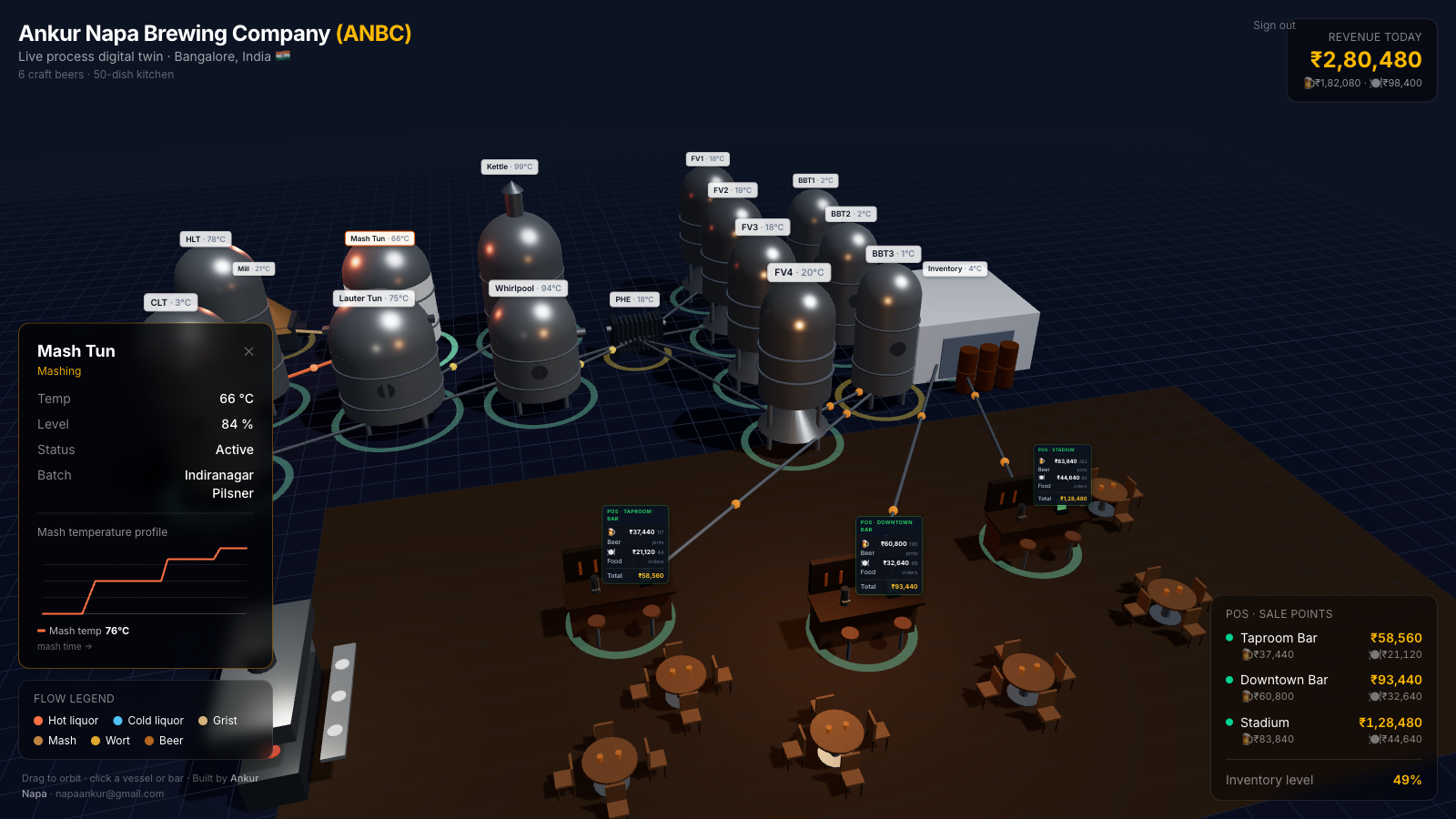
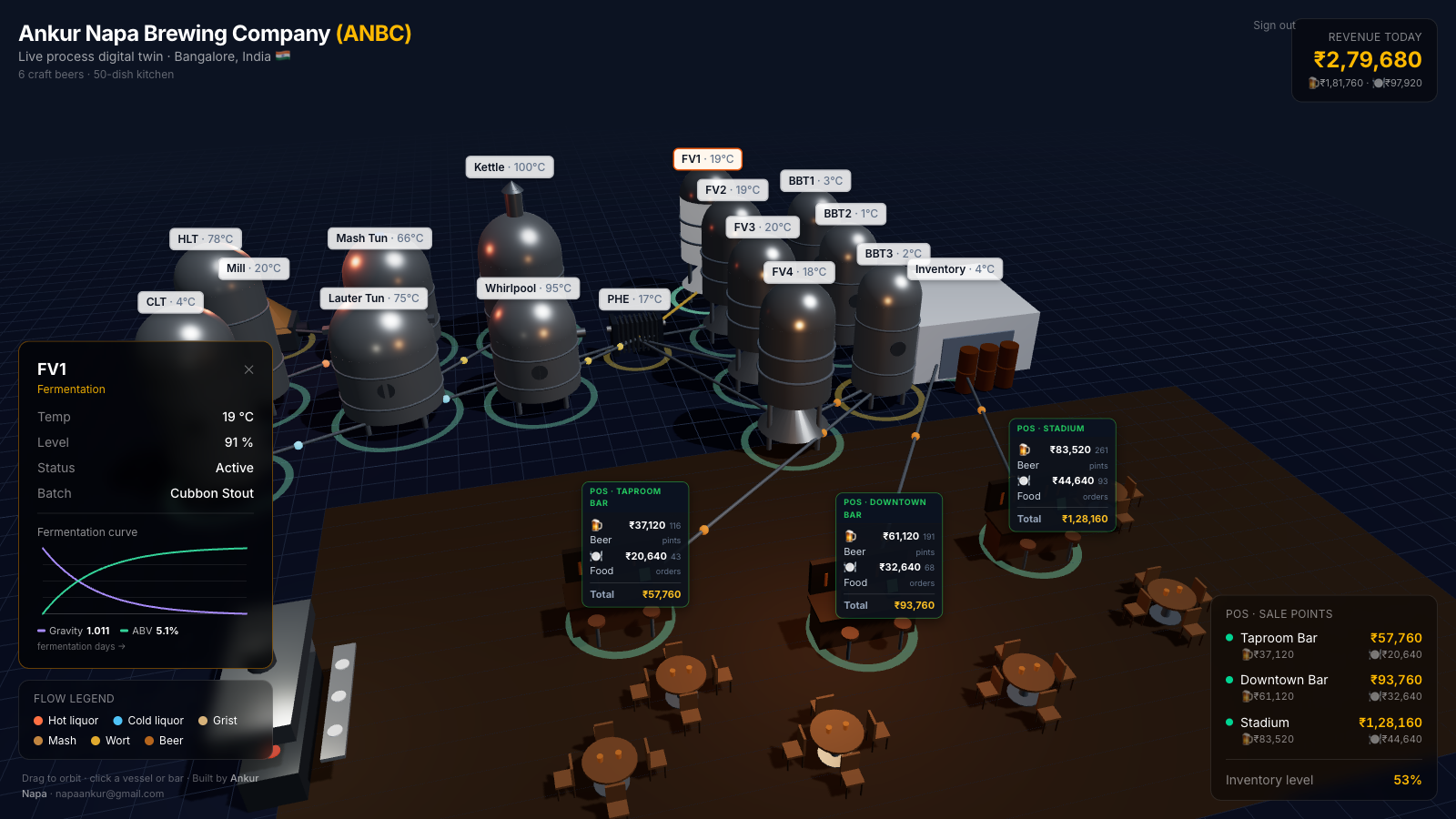
When you click a vessel you don't get a generic gauge — you get the chart that vessel deserves: a step-temperature mash profile for the mash tun, run-off flow for the lauter, a falling-gravity-and-rising-ABV curve for a fermenter, carbonation for a bright tank. These are lightweight hand-drawn SVG line charts rather than a charting library, for the same reason the geometry is procedural — keep the payload small and the control total. Each chart is just a function of the vessel id, so the right curve appears for the right tank.
Where this breaks
The honest limits, because "just code it" isn't always right. Procedural geometry has a ceiling — it's perfect for cylinders, cones and domes, but the moment you want a branded, organic, or photoreal asset (a sculpted logo, a realistic forklift, a textured brick wall), primitives fight you and Blender plus a glTF export is the correct tool; the decision rule is realism-and-uniqueness versus clarity-and-weight. Detail costs frames — every leg, band and topper is more meshes to draw, so on a big plant you'll want instancing or merged geometry before the frame rate suffers, and I haven't needed that yet but a 200-vessel site would. A clean model can still lie — geometry that looks right tells you nothing about whether it's wired to real data; a beautiful twin on fake numbers is a screensaver, which is exactly the gap Part 3 closes. And "data-driven" is only true if you're disciplined — the second someone hard-codes a position in the scene instead of the data file, the single-source-of-truth promise quietly breaks.
The bottom line
Don't reach for Blender because modeling "should" happen there. Look at what you're modeling: a brewhouse is primitives, so code the vessels, give each one the detail that signals its function, and — most importantly — drive the entire plant from one process-data file so the scene, the flow and the charts all move when you edit it. Reserve Blender for the shapes primitives genuinely can't express. The geometry is the easy part; the discipline of one source of truth is what makes a twin you can actually maintain. Next up, [Part 3]: connecting it to real-time data and plain-language voice, so the twin stops simulating and starts reporting.
Frequently asked questions
Do you need Blender to model a brewery in 3D? No. Brewhouse vessels are mostly cylinders, cones and domes, so they can be built procedurally in code with React Three Fiber and Three.js primitives. That keeps the bundle tiny, removes the asset pipeline, and means the geometry is driven by data instead of files. Blender earns its place when you need organic shapes, branded detail, or photoreal materials that primitives can't express — then you export glTF and load it. For a process twin where clarity beats realism, procedural wins.
How do you make different tanks look like different vessels? Function-specific detail. A mash tun gets an agitator gearbox on top, a lauter tun gets a rake drive bridge, a kettle gets a tall vapor stack, fermenters are cylindro-conical on legs with glycol bands. I encoded these as a "topper" field on each vessel so the geometry maps to what the vessel actually does — you can read the brewhouse at a glance without labels.
How is the flow between vessels animated? Each connection is an edge in a data file with a "from", a "to" and what's flowing (hot liquor, mash, wort, beer). The 3D layer draws a pipe between the two vessel positions and runs small particles along it, colored by content, using the render loop to interpolate their position. It reads as product physically moving through the plant, and adding a new pipe is one line of data, not new geometry.
Why drive everything from a single data file? Because a digital twin is only maintainable if the model is the source of truth. One file lists every vessel — id, name, position, size, content, topper — and every flow edge. The scene, the labels, the flow animation and the charts all read from it. Change the plant in one place and the whole twin updates, which is what separates a maintainable twin from a hand-placed 3D scene that rots.